4×2 Matrix, Splitter & Scaler
Route four 18Gbps sources to two 18Gbps outputs. Process two 4K signals at once, or duplicate one channel to 1080p for older gear — HDCP and scaling rules are applied on the fly.

Tailored for AV purists
4K HDR 18Gbps HDMI Matrix, Scaler, HDCP Doctor & Dolby Vision LLDV enabler
Four inputs, two 18Gbps outputs, a dedicated HDMI audio out and the most advanced HDMI toolbox ever built. Bring Dolby Vision to HDR10 projectors, fix HDCP, manage EDID, extract eARC audio, scale any signal — and control it all from your browser.
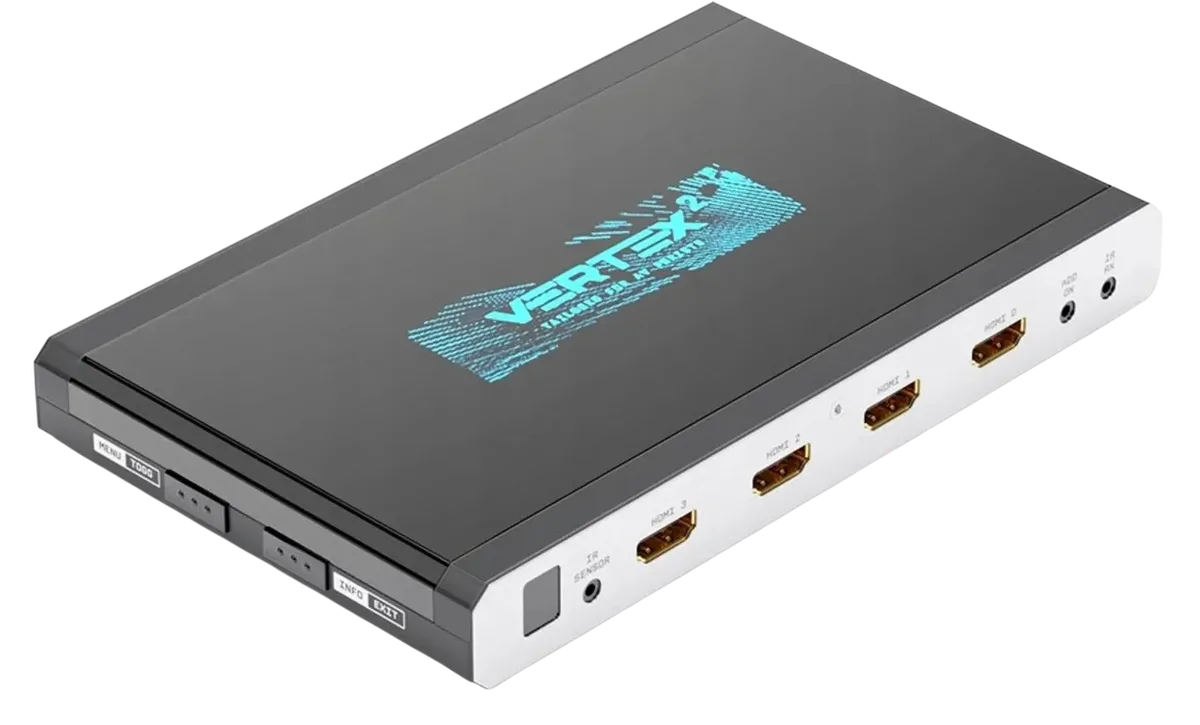


 Dolby Vision · HLG · Atmos · DTS:X · HDMI 2.0b · HDCP 2.2
Why Vertex²
Vertex² always runs in Matrix/Scaler mode, so every connected device gets the best possible signal — automatically.
Route four 18Gbps sources to two 18Gbps outputs. Process two 4K signals at once, or duplicate one channel to 1080p for older gear — HDCP and scaling rules are applied on the fly.
Fifteen HDCP 1.4 and 2.2 engines convert HDCP 2.2 ↔ 1.4 both ways, on all channels simultaneously. Connect any source to any display without a black screen.
Pull up to Dolby Atmos HBR over TrueHD from your eARC TV's apps and feed it to any AVR input through the dedicated HDMI audio output — no AVR upgrade required.
100 predefined EDIDs, five EDID modes (Copy TX0, Copy TX1, Fixed, Custom, Automix) and 13 forceable flags. Each input can run its own EDID; DV strings are sniffed automatically.
Inject, extract, translate or replace HDR/HLG/DV metadata and AVI infoframes in real time. Translate HLG to HDR, boost values, or block metadata entirely.
4K ↔ 1080p scaling with or without color depth maintained, chroma conversion, color space and color depth changes at 8/10/12/16 bit. Individual rules per output.
What owners use it for
From the HDfury community, AV forums and calibrators — these are the real-world problems a Vertex² solves every day in home cinemas, living rooms and installs.
Vertex² presents a Dolby Vision EDID to your player (Apple TV 4K, Shield, Oppo, Panasonic, Sony, Xbox…), so the source outputs Low-Latency Dolby Vision — tone-mapped per scene — which Vertex² hands to your projector as a signal it accepts. JVC, Sony and Epson projector owners describe the result as a big step up from static HDR10, with dynamic tone mapping that rivals far more expensive video processors.
Edit or replace MaxCLL, MaxFALL and mastering-display values on the fly, boost or lower HDR levels, translate HLG to HDR10, or strip HDR flags to force SDR. Build a custom EDID and DV data block tuned to your exact screen and projector.
HDCP 2.2 source with an HDCP 1.4 receiver, projector or matrix? The HDCP Doctor converts both ways on every channel, so 4K streaming boxes, consoles and UHD Blu-ray players work with older gear without a black screen.
Split video and audio: 18Gbps 4K HDR goes straight to the display, while a separate 1080p stream carries every audio format (Atmos, DTS:X, TrueHD) to a non-4K receiver. No AVR upgrade needed.
Netflix, Disney+ or Apple TV+ in your TV's own apps? Vertex² extracts eARC (up to Atmos HBR over TrueHD) or ARC audio and feeds it to any HDMI or optical input on your AVR or soundbar — even receivers with no ARC at all.
Watch a film on the projector while the kids game on the OLED — two different 18Gbps signals at once from a 4×2 matrix, or mirror one source to both with independent scaling for each screen.
Vertex² sends RS232 or IP macros to your projector based on the incoming signal: switch to the right picture mode, lens memory or gamma for SDR, HDR10, HLG, 3D or 24p content — automatically, every time.
Apple TV 4K, Xbox and Shield keep +5V alive in standby, so ordinary switches can't auto-select them. Vertex² switches on actual pixel-clock activity — and manages +5V on the output to stop Android TVs waking up at night.
Lock a source to 4K60 4:4:4, 4:2:2 12-bit, BT.2020, stereo or 5.1, with or without HDR/DV — per input. Solve handshake fights between picky sources, matrices and long cable runs.
Downscale a 4K HDR feed to 1080p for a legacy AVR, a Full HD projector in a second zone, a capture card, video-over-IP extender or a Hue/ambient-light sync box — while the main display still gets full 18Gbps.
Give an older Blu-ray player, set-top box or console a clean 4K output with chroma and color-depth conversion, so a 4K-only projector or matrix accepts it without complaint.
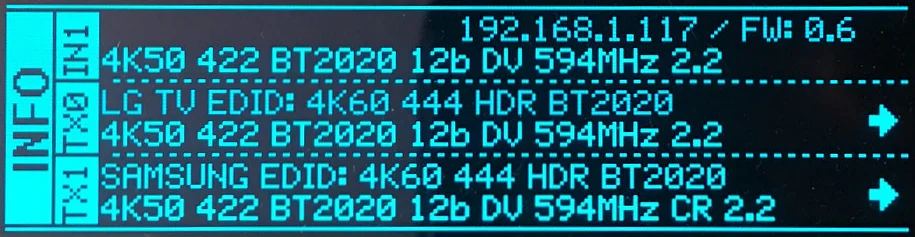
OLED, on-screen display and web page show resolution, chroma, bit depth, colorimetry, HDCP version, EOTF, MaxCLL/MaxFALL and true frame rate to three decimals. The go-to tool for calibrators and anyone chasing HDMI bugs.
Under 1ms of added latency. Force RGB or 4:4:4, keep HDR10 or strip it for a better SDR game mode, and route a console to the TV while the disc player owns the projector.
Display your own text on screen, or mask a burnt-in TV channel logo to protect an OLED or projector lamp. Handy for retail, showrooms and demo rooms.
Signal equalisation, hot-plug control and an HDMI booster (1080p up to 15m in and out, 4K up to 10m) cure dropouts on longer cables in ceiling-mount projector setups.
Control everything from a browser, the HDfury app, IR, RS232, IP/Telnet or CEC. Ready-made codes for Logitech Harmony, iRule and Control4/Crestron-style systems make it a favourite of custom installers.
Connectivity
4K60 4:4:4 8-bit, 4K60 4:2:2 12-bit, 4K120 4:2:0 or 8K30 4:2:0 — every port on Vertex² speaks full-bandwidth HDMI 2.0b.
Inputs
Outputs

Android TV and similar sinks that keep checking the link in standby are handled by an exclusive output management mode, so your display sleeps when it should and wakes instantly when it shouldn't.
Audio
Vertex² extracts the maximum audio capability from every source and forwards it as a self-generated 720p/1080p stream — so an AVR that can't handle 4K still gets full Atmos.
Total control
No drivers, no software installs. Type the Vertex² address into any browser and take command of your whole setup.
Mac, Windows, Linux, iOS, Android — any browser. In-system firmware updates, config export, EDID upload, macros and every setting in one elegant interface. Read the web server manual →
Resolution, chroma, color depth, colorimetry, HDCP, VIC, EOTF, MaxCLL/MaxFALL, frame rate to three decimals and every infoframe — on the OLED, on-screen OSD or web.
Send custom RS232 commands to your projector based on incoming content (3D, HDR10, SDR BT.2020…). Pronto IR codes are in iRule and Logitech Harmony. Full CEC command manager.

A 256×64 blue OLED shows the active input, IP address, firmware version, sink EDID name and the exact signal going out — with arrows for upscaled, downscaled or passthrough. Four side buttons give you MENU/TOGGLE, INFO/EXIT, OUT1/UP and OUT0/DOWN without touching a computer.
Specifications
Not sure what 4:2:2, EDID or eARC means? Every term links to our plain-language glossary, which also explains how to use it on the Vertex².
| Type | 4× In / 2× Out Splitter/Matrix/Scaler + HDMI audio out (HDMI 2.0b / 1.4 / DVI 1.0) |
| Bandwidth | 18Gbps · 600MHz · 4K60 4:4:4 passthrough |
| Max resolution | 4K60 4:4:4 8b · 4K60 4:2:2 12b · 4K120 4:2:0 8b · 8K30 4:2:0 8b |
| HDR | HDR10, HDR10+, HLG, Dolby Vision, LLDV |
| Color depth | 8 / 10 / 12 / 16-bit (48-bit deep color), xvYCC |
| Scaling | 4K24–60 ↔ 1080p24–60 up/down, chroma, color space & depth conversion, DCI 4096×2160 |
| Input lag | <1ms |
| 3D | Passes 3D stereoscopic formats |
| HDCP Doctor | HDCP 2.2 → 1.4, 1.4 → 2.2, x.x → x.x; dual HDCP 1.4 & 2.2 combined |
| Engines | 15 HDCP 1.4 / 2.2 encryption & decryption engines |
| EDID | 100 tables (10 custom / 90 dedicated), per-input EDID, Automix with 13 flags & 5 algorithms |
| Infoframes | Capture, edit, block or replace HDR, AVI, VSIF; read SPD, AUD, HVS, HFV |
| API | Public API/DLL access for metadata & infoframe control |
| I/O | 4× HDMI in, 3× HDMI out, IR, RS232, RJ45, analog mini-jack, optical S/PDIF |
| Audio | PCM ≤192kHz, IEC61937, DSD, DST, DTS, DTS-HD, DTS-MA, Dolby TrueHD, HBR, DD+, DTS:X, Atmos |
| ARC / eARC | On HDMI TX0; extraction to HDMI audio out & optical |
| CEC | Inter-device control between inputs and TX0 |
| Control | IR, IP/Telnet, RS232, CEC, web server, push buttons, mobile app |
| Display | 3.12″ OLED, 256×64, blue |
| Power | External 12V (110–240V 1.2A in, 12V 1A out) |
| Dimensions | 11.5 × 18.5 × 2.4 cm (4.5″ × 7.3″ × 0.9″) |
| Weight | 520 g / 1.15 lbs |
| Enclosure | Black PVC / black metal with blue OLED |
| Regulation | CE, EAC, FCC, RoHS, WEEE |
Gallery
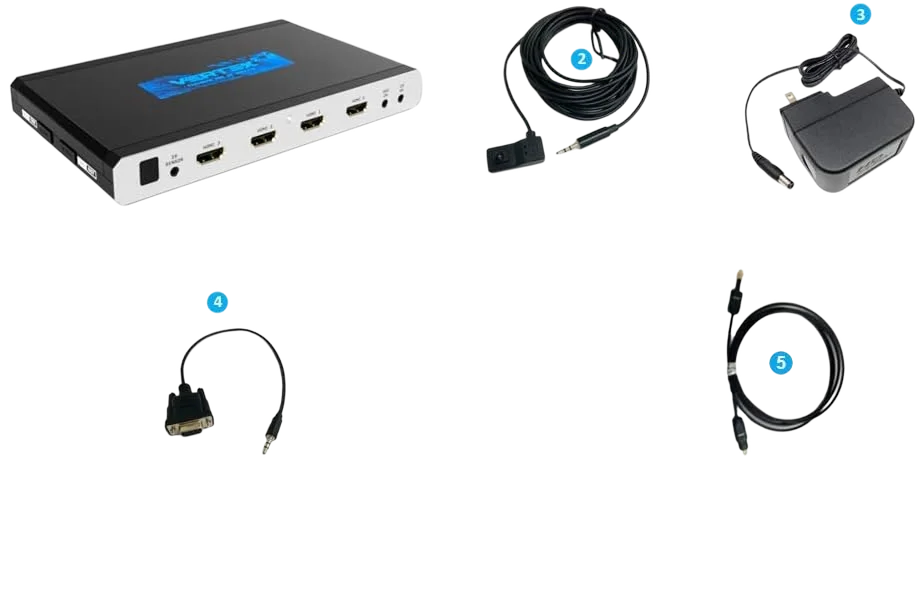
Vertex² unit, IR receiver cable, 12V power supply, RS232 cable and optical cable.


FAQ
Yes — this is one of the most popular uses. Vertex² presents a Dolby Vision EDID to your source so it outputs Low-Latency Dolby Vision (LLDV) with per-scene tone mapping, and passes it to your HDR10 projector or TV as a compatible signal. Works with Apple TV 4K, Shield Pro, Xbox, Fire TV, Oppo, Panasonic and Sony players.
Yes. All four inputs accept 4K HDR10, HDR10+, HLG, Dolby Vision and LLDV signals up to 18Gbps, and both HDMI video outputs pass them through at full bandwidth. Vertex² also sniffs and stores the DV string from your TV so you can route Dolby Vision through equipment that doesn't support it.
Yes. Connect an eARC TV to the TX0 output and Vertex² extracts up to Dolby Atmos HBR over TrueHD from TV apps, feeding it to any AVR input via its dedicated HDMI audio output.
Yes. The built-in HDCP Doctor with 15 HDCP 1.4/2.2 engines converts HDCP 2.2 to 1.4 and 1.4 to 2.2 in both directions on all channels simultaneously.
Via the embedded web server from any browser (Mac/Win/Linux/iOS/Android), IR, RS232, IP/Telnet, CEC, the OLED menu buttons or the HDfury mobile app for iOS and Android.
Yes. Each output has individual scaling rules with upscale, downscale, passthrough and bypass modes, including chroma, color space and color depth conversion at 8, 10, 12 and 16 bit.
The complete manual is online here, one page per topic: Vertex² online manual. All firmware versions, the PDF manual, the EDID collection and Control4/Savant drivers are on the Downloads page.
Use 600MHz-certified or tested 4K cables for any 18Gbps link (4K60 4:4:4 8b / 4K60 4:2:2 12b). Atmos via ARC additionally requires a cable that supports 192kHz ARC.
Get yours
Vertex² is the reference tool for home-theater enthusiasts, calibrators and integrators who refuse to compromise on signal quality.
Buy HDfury Vertex²