
Vertex² User Manual · PDF pages 38–39
Updating Firmware via Web Browser
Updating your Vertex² Firmware via web browser
The Vertex² Firmware can be updated from any web browser based device.
If you meet any issue updating your Vertex² firmware, please try using Chrome Browser on your device.
You can download the latest Firmware version for your Vertex² device from the Download Tab on the Vertex² Product page: here. If you are unsure about your Firmware version currently in use, simply refer to OLED display on your unit. Alternatively, FW version is reported on any header of any page when accessing the embedded web server.
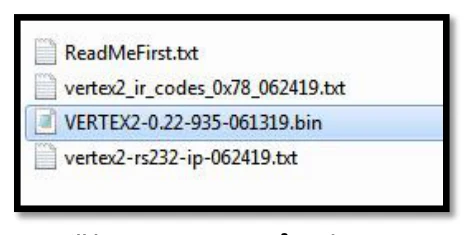
Once downloaded and extracted, you should have a directory on your computer with the following files
You will have to run Vertex² Update to successfully upgrade your Vertex². Note: Version number could be different depending on the FW revision you downloaded.
After updating the Vertex² firmware, you will be prompted to refresh the webpage once unit have rebooted, you won’t see any light or OLED info for about 15s as the unit is restarting and reconfiguring itself. Once ready, OLED and light will come back on.
Visit Vertex² webserver and browse to the bottom on the CONFIG section.
Click Choose File as shown on the above picture and select Vertex² firmware file.
Once correct Firmware file is selected, its name will appear on the config page. Simply click SEND button to start flashing the firmware to your unit.
During this process you will see the above message on the footer page of the config section. Please wait a few seconds and do not disconnect your device while the upgrade process is running.
Once completed, you will see the above notification. Simply wait for Vertex² OLED to come back on and click REFRESH. The top section of the web server and Vertex² OLED should now indicate the new firmware version.
Congratulations, you have successfully updated your Vertex² firmware update and your unit is now ready to operate with the benefits from the latest software additions.
Public API/DLL: We have created a set of DLL/API package for Vertex² so anyone can interface their software with Vertex² capabilities and build evaluation, testing, measurement, calibration and content creation workflows system. IR/RS232: Vertex² can be fully controlled via IR or from any serial based computer such as Win, Max or Linux using RS232 interface. Complete list of IR and RS232 commands are included as a text file for convenience on all Firmware update package.