
Vertex² User Manual · PDF pages 24–25
Web Server – SCALER Section
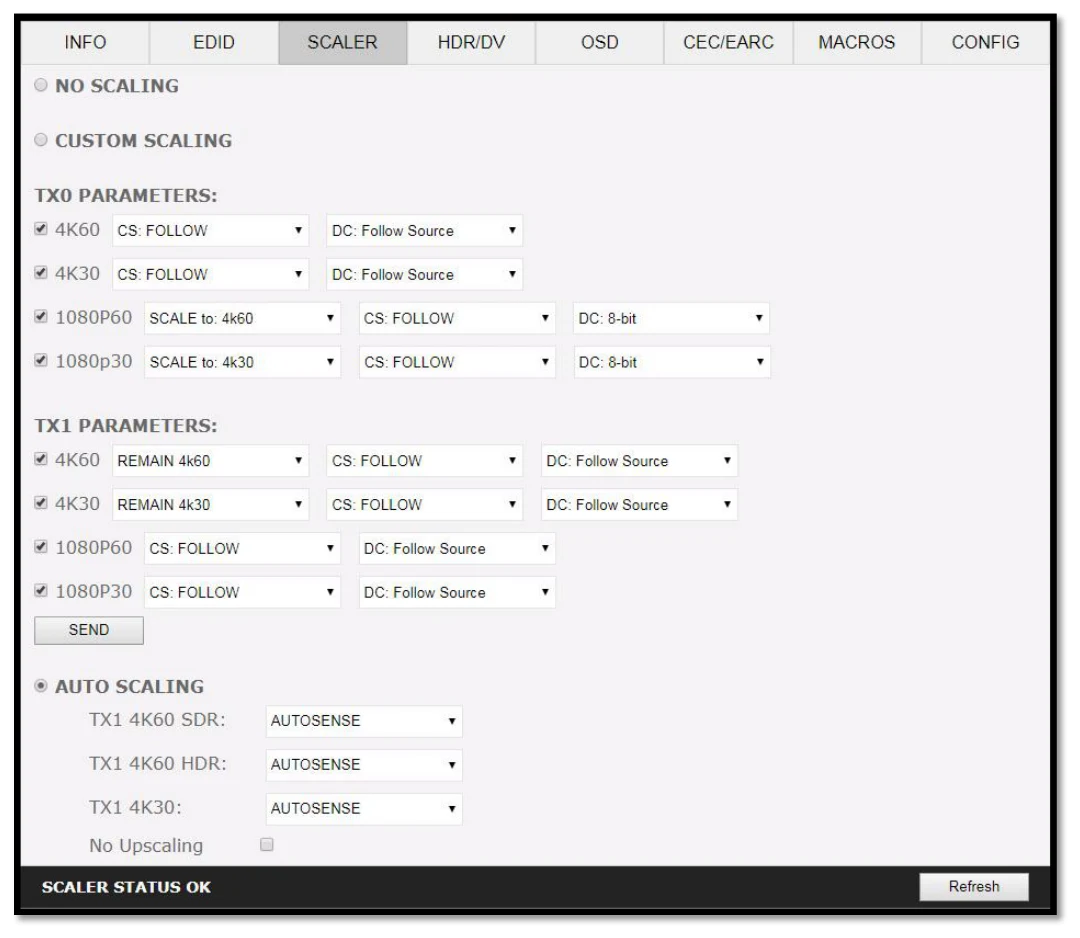
[No Scaling] Set your unit to No Scaling for the signal to pass-through untouched
[Custom Scaling] Set your Vertex² unit to Custom Scaling to manually define the scaling parameters. You can select between various type of resolutions, color space and deep color settings for TX0 Upscale output port and TX1 Downscale port.
Available Color Space options: Follow Input (default), RGB FULL, RGB BT2020, 4:4:4 BT.709, 4:4:4 BT2020, 4:2:2 BT.709, 4:2:2 BT2020, 4:2:0 BT.709, 4:2:0 BT2020. Available Deep Color options: Follow Input (default), 8-bit/24-bit, 10-bit/30-bit, 12-bit/36-bit, 16-bit/48- bit Available 1080P60 Upscale options: SCALE to 4K60, REMAIN 1080P60 Available 1080P30 Upscale options: SCALE to 4K30, REMAIN 1080P30 Available 4K60 Downscale options: REMAIN 4K60, SCALE to 1080P60 Available 4K30 Downscale options: SCALE to 4K30, SCALE to 1080P30
[SEND] Upload your custom scaling changes to the Vertex² unit.
[Auto Scaling] Set your unit to Auto Scaling to use automatic pre-sets for TX1. By default unit will use auto-sense.
[TX1 4K60 SDR PRESET] This forces any 4K50 or 4K60 input to come out as 4K60 420 8bit 300MHz or 1080p60 444 12-bit or 1080p60 444 8-bit. A neat profile for people who only have a 300MHz display with 4K60 420 8-bit support or older HDMI revision equipment that only support 1080p (deep color or not). If EDID allows the player to send HDMI 2.0 formats, they will be accepted by the display due to Vertex² scaling/chroma changes.
[TX1 4K60 HDR PRESET] This forces 4K50 and 4K60 422 HDR input to come out as 4K60 420 12-bit, 4k60 420 8-bit 300MHz or 1080p60 444 12-bit or 1080p60 444 8-bit. A neat profile for people who only have a 300MHz display with 4K60 420 10 or 8-bit support. If EDID allows the player to send HDMI 2.0 formats, such as all HDR modes, they will be accepted by the display due to Vertex² scaling/chroma changes.
[TX1 4K30 PRESET] This forces any 4K24/25/30 to come out as 4K24/25/30 444/RGB 8-bit 300MHz, 1080p30 444 12-bit or 4K24/25/30 422 12-bit 300MHz. A neat profile if you have a 300MHz display. If EDID allows the player to send HDMI 2.0 formats, they will be accepted by the display due to Vertex² scaling/chroma changes.
[TX0 NO UPSCALING] By default when using Auto Scaling, Vertex² will upscale TX0 when possible, to disable this behavior or to let the sink/display performs the upscaling, you can check this option.
[REFRESH] Refresh the current page.